Toque
A recipe-gathering and sharing app for novice cooks. Toque wanted to grow engagement and retention by giving users more ways to save and customise recipes. I designed an experience that adapts to the time, energy and ingredients people actually have on hand.
Type
Concept
Project
Solo Project
Role
UX Designer
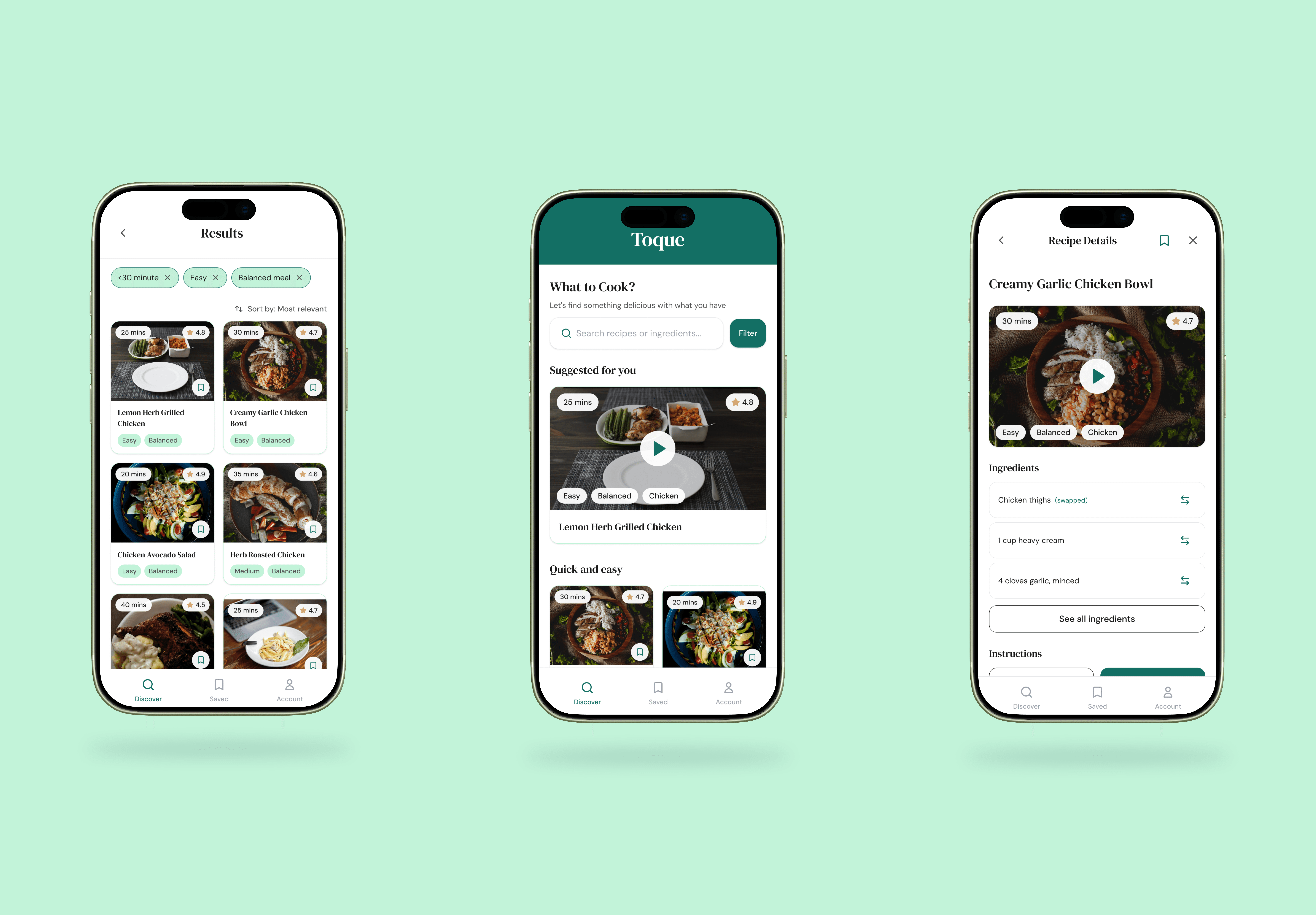
Designing a flexible recipe app
Overview
Challenge
As part of the GA x Adobe Scholarship Programme, this project was a class brief on design exploration and rapid prototyping for a recipe-gathering and sharing app. Toque wanted to give novice cooks more options to save and customise recipes, and to find innovative ways to drive engagement and lift retention rates that recipe apps usually struggle with.
Solution
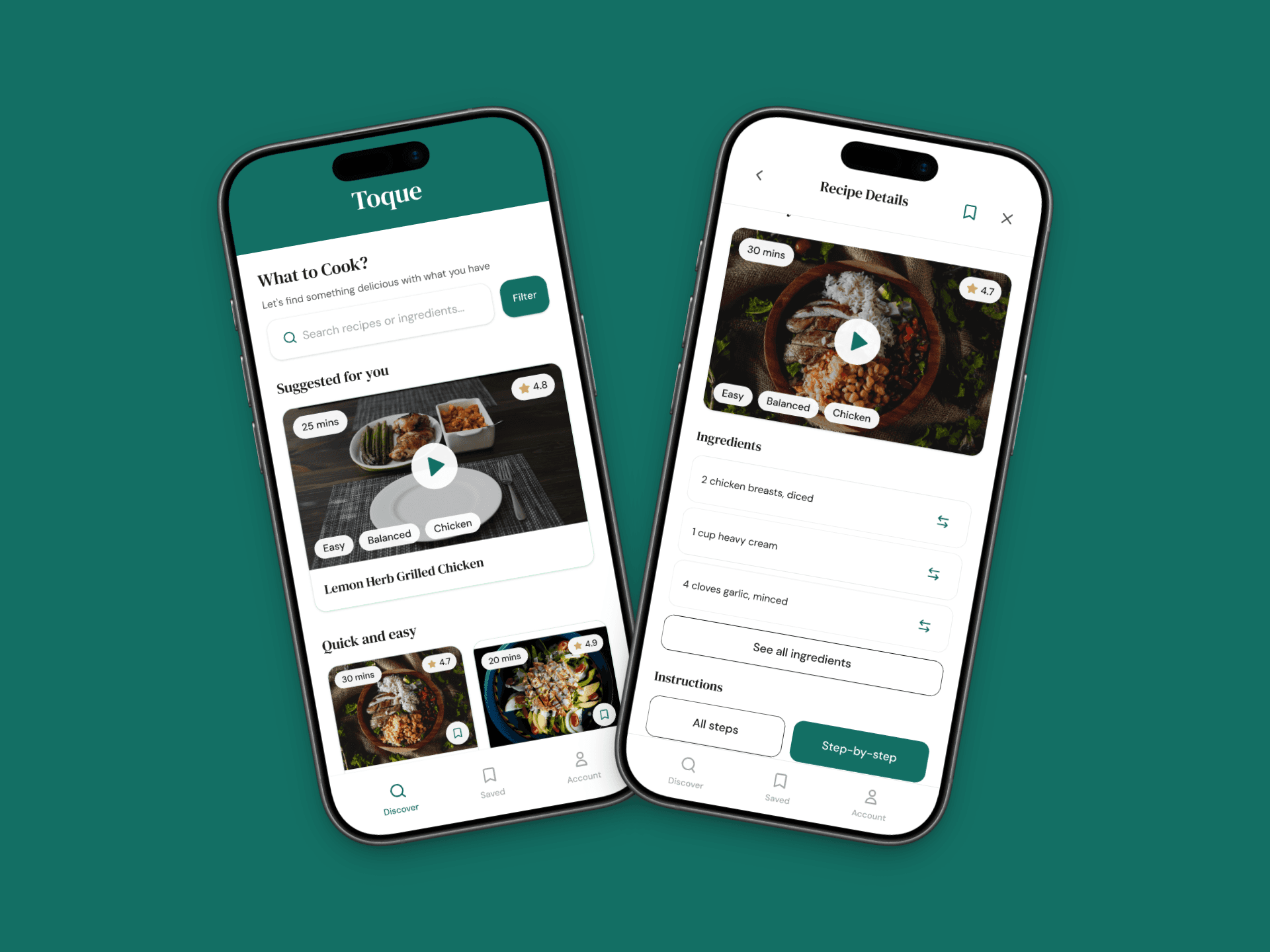
I designed a mobile experience that helps novice cooks find and adapt recipes around their real-life constraints. A home page with suggested recipes and quick filtering by time, effort and ingredients reduces decision fatigue, an ingredient swap feature lets users adapt any recipe to what they have, and a clearer save flow means recipes can be revisited without starting from scratch.
My Role
I was the sole designer on this project. I planned and ran research, synthesised insights, defined the user and problem, ran ideation through to lo-fi sketches and a lo-fi prototype, conducted usability testing, and delivered a refined hi-fi prototype in Figma Make.

01 Discover
Understand and uncover
Understanding where novice cooks get stuck.
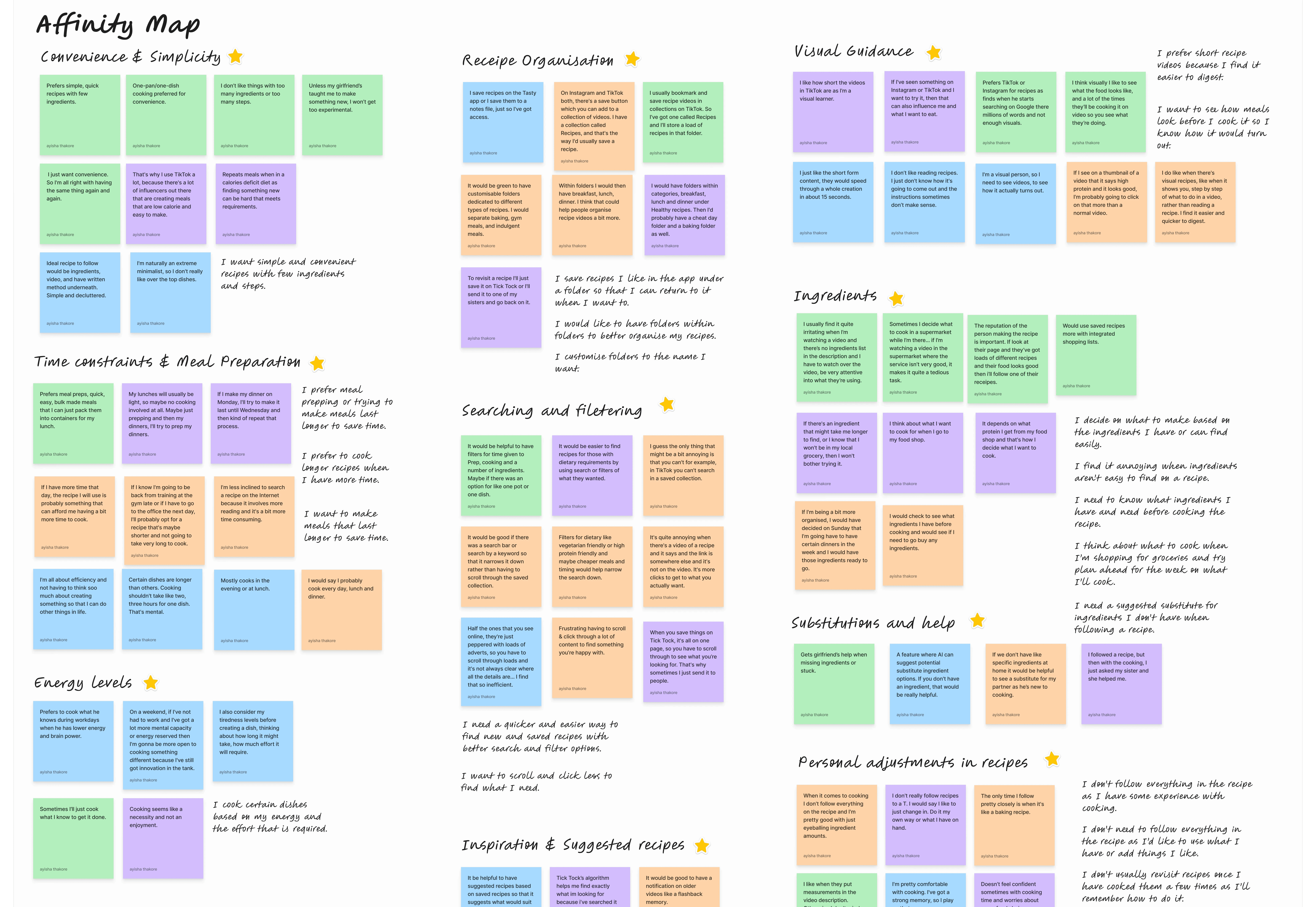
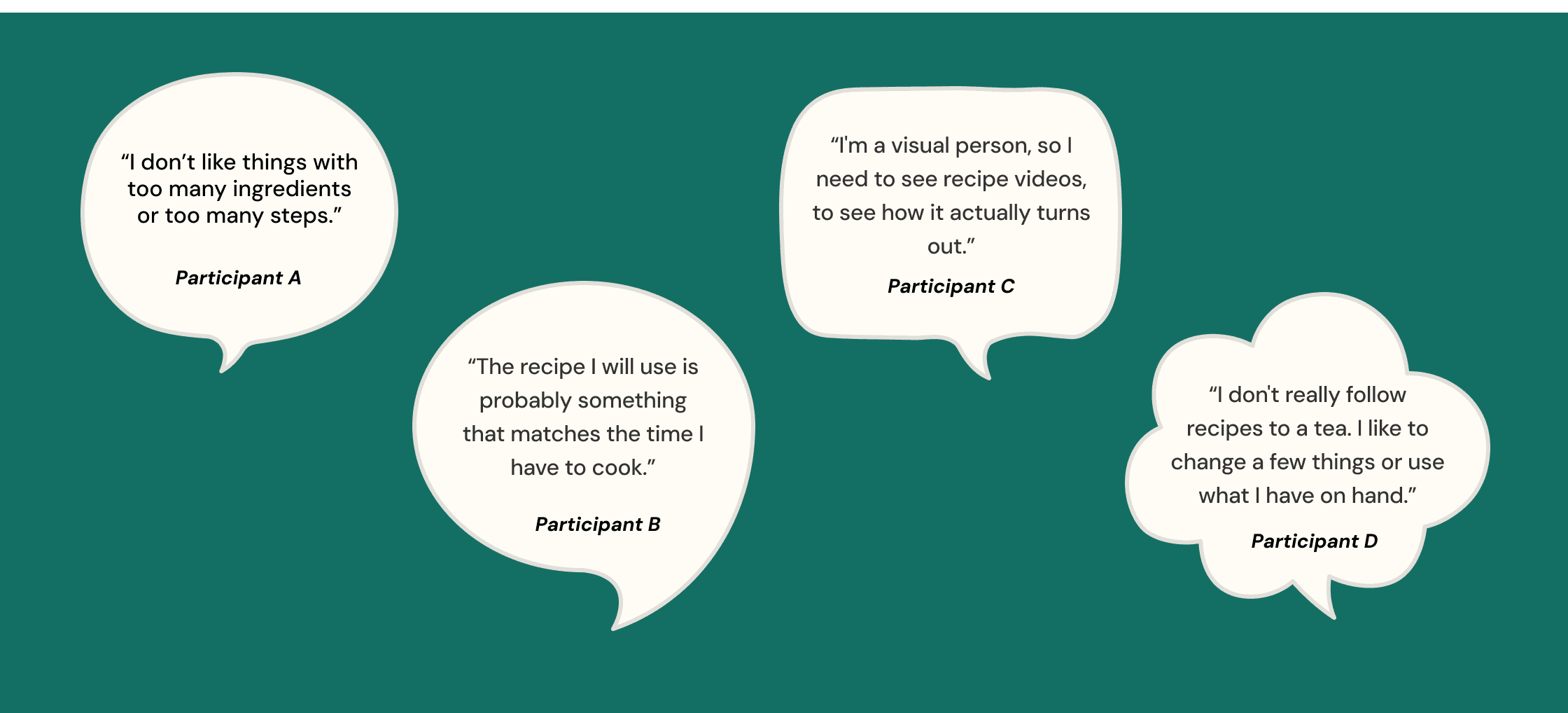
To understand what motivated novice cooks to use recipes online and what challenges caused drop offs, I ran moderated user interviews with 4 participants who I recruited from my personal network (aged 25–29 who regularly cook at home and use online recipes). I also conducted a competitor analysis against apps like Tasty, BBC Good Food and TikTok-style video recipes to benchmark engagement features. I synthesised my research by affinity mapping to draw out key insights.
01
Simplicity decides whether they cook at all.
Across all 4 interviews, novice cooks gravitated to recipes that felt quick, simple and low-effort. Long ingredient lists or step-heavy methods were the single biggest reason a recipe got skipped. Complex recipes combined with decision fatigue meant “I'll order in instead.”
02
Time and energy drive recipe choice more than craving.
Participants chose recipes based on how tired they felt and how much time they had, not what they fancied. Many leaned toward batch cooking and meal prep so weeknights took less mental load. Apps that didn't surface time and effort upfront forced users to read the whole recipe just to rule it out.
03
Visual guidance builds confidence faster than text.
Short videos and clear visual previews helped users understand a recipe quickly and feel more confident attempting it. Long blocks of written instructions dropped engagement, especially for newer cooks who couldn't yet visualise the technique from words alone.
04
Flexibility with ingredients is essential.
Users almost never followed recipes exactly. They swapped ingredients all the time based on what was in the fridge and cupboard, but no app supported this well. The result was second-guessing, relying on others for help or having to spend time searching for swaps.
05
Finding and revisiting saved recipes was frustrating.
Saving was easy. Finding the saved thing again wasn't. Users described their saved recipes as "a graveyard’” as it was unsorted and unsearchable so ultimately unused.
Carrying findings forward to define.
Novice cooks didn't need more recipes, they needed an app that adapted to them. I carried these insights into Define to shape one persona, one core problem and a focused set of How Might We statements.
01 Discover
Understand and uncover
Understanding where novice cooks get stuck.
To understand what motivated novice cooks to use recipes online and what challenges caused drop offs, I ran moderated user interviews with 4 participants who I recruited from my personal network (aged 25–29 who regularly cook at home and use online recipes). I also conducted a competitor analysis against apps like Tasty, BBC Good Food and TikTok-style video recipes to benchmark engagement features. I synthesised my research by affinity mapping to draw out key insights.
01
Simplicity decides whether they cook at all.
Across all 4 interviews, novice cooks gravitated to recipes that felt quick, simple and low-effort. Long ingredient lists or step-heavy methods were the single biggest reason a recipe got skipped. Complex recipes combined with decision fatigue meant “I'll order in instead.”
02
Time and energy drive recipe choice more than craving.
Participants chose recipes based on how tired they felt and how much time they had, not what they fancied. Many leaned toward batch cooking and meal prep so weeknights took less mental load. Apps that didn't surface time and effort upfront forced users to read the whole recipe just to rule it out.
03
Visual guidance builds confidence faster than text.
Short videos and clear visual previews helped users understand a recipe quickly and feel more confident attempting it. Long blocks of written instructions dropped engagement, especially for newer cooks who couldn't yet visualise the technique from words alone.
04
Flexibility with ingredients is essential.
Users almost never followed recipes exactly. They swapped ingredients all the time based on what was in the fridge and cupboard, but no app supported this well. The result was second-guessing, relying on others for help or having to spend time searching for swaps.
05
Finding and revisiting saved recipes was frustrating.
Saving was easy. Finding the saved thing again wasn't. Users described their saved recipes as "a graveyard’” as it was unsorted and unsearchable so ultimately unused.
Carrying findings forward to define.
Novice cooks didn't need more recipes, they needed an app that adapted to them. I carried these insights into Define to shape one persona, one core problem and a focused set of How Might We statements.
02 Define
Focus and frame
Meet Elena, our novice cook.
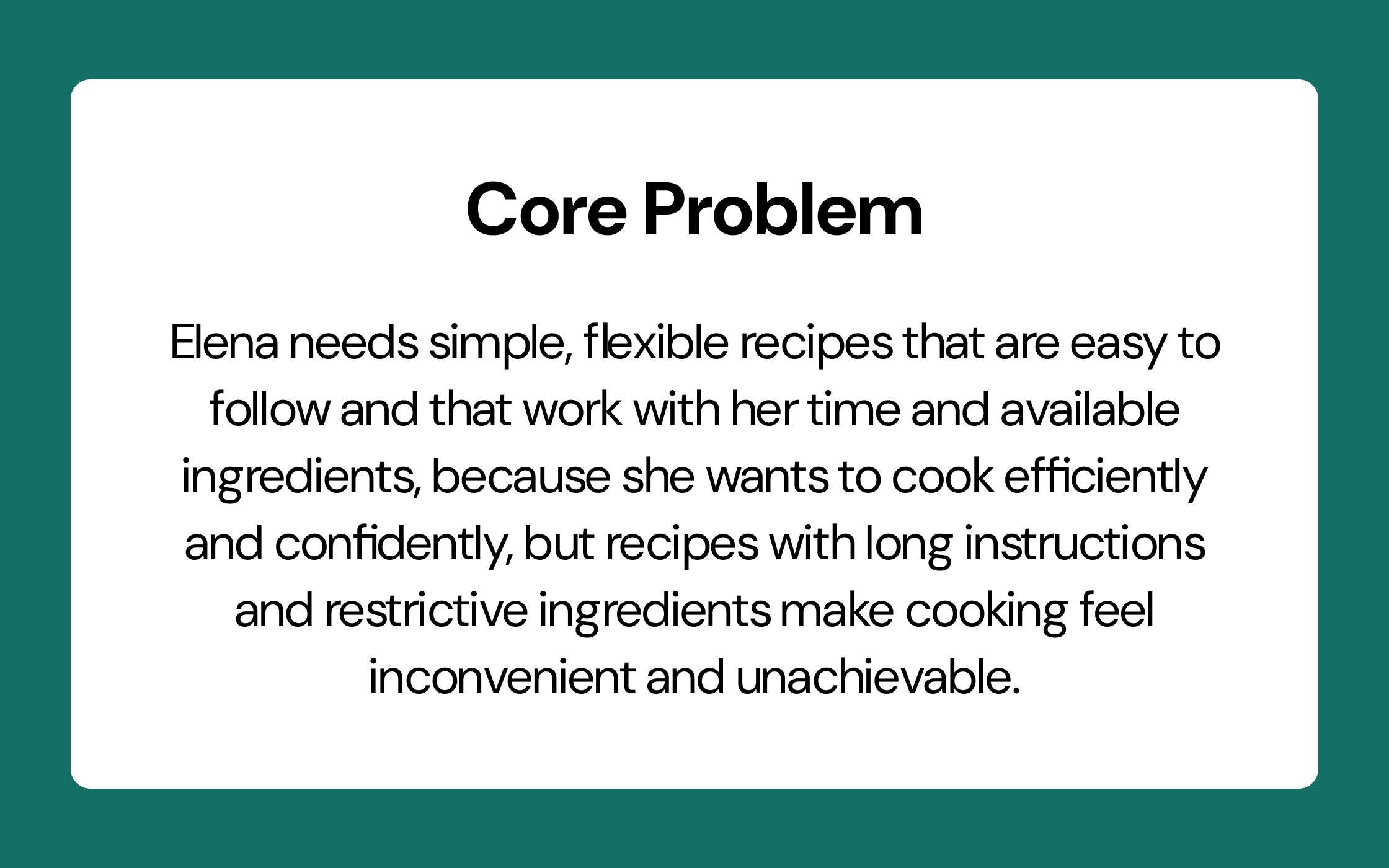
After clustering themes with an affinity map, I synthesised the research into one persona to translate research findings into a representative user so that it is easier to build empathy and to stay grounded in real behaviours and needs when making design decisions. From there I defined a core problem statement before exploring How Might We questions to carry into the ideation phase.
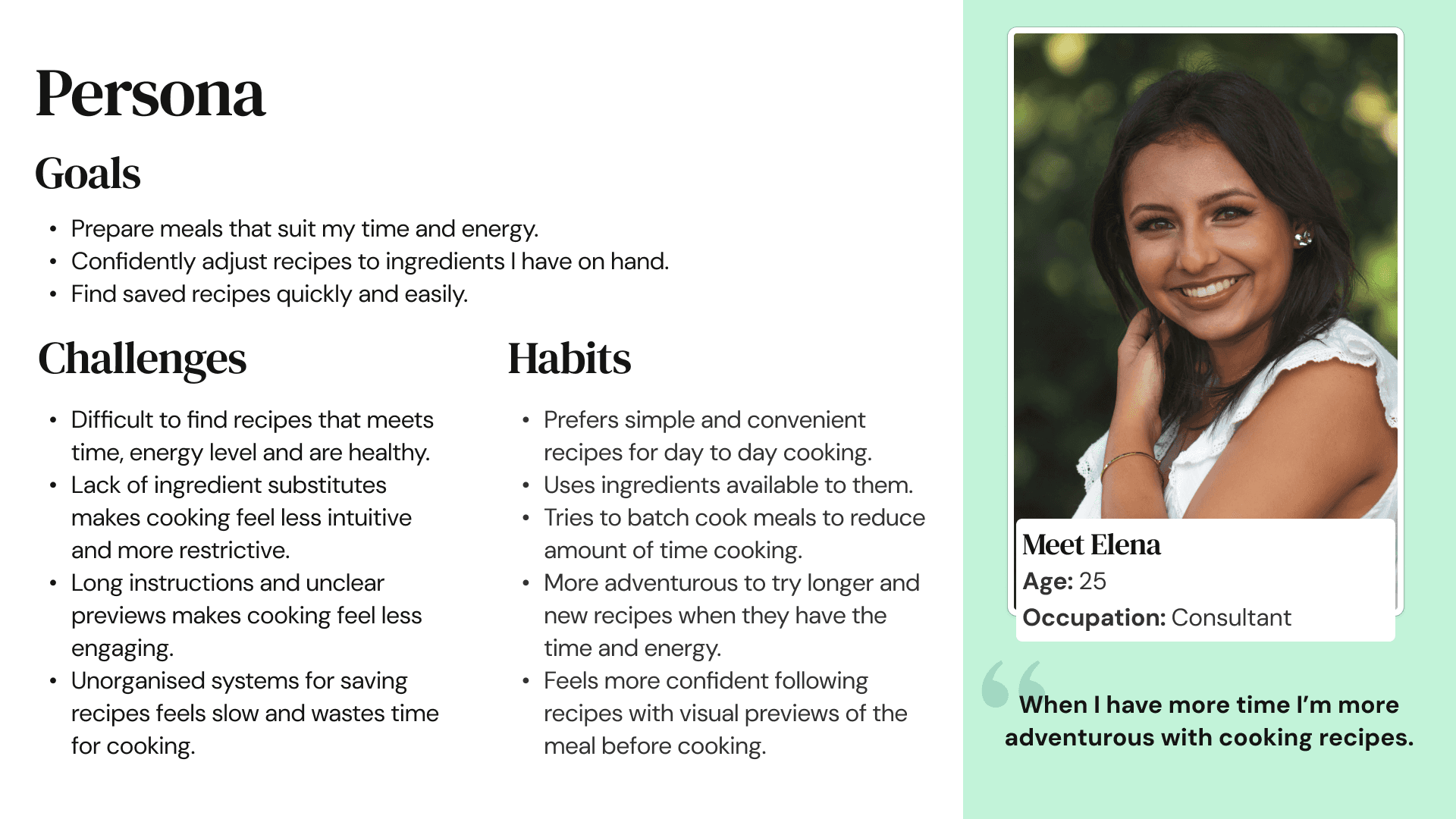
Elena, 25, is a consultant who wants to be more adventurous in the kitchen but feels cooking becomes a mission after a long day of work. She wants simple, flexible recipes that she can adapt to what's in her fridge, with visual previews so she knows what she's getting into before she starts.
Success meant cooking felt achievable, not aspirational.
For Elena, success meant going from "I don't have the energy" to "I can actually make this" by finding a recipe that fit her time, effort and ingredients without scrolling through hundreds of options. For Toque, it meant small interactions that build engagement and a clear save flow that brings users back.
Exploring opportunities to help Elena.
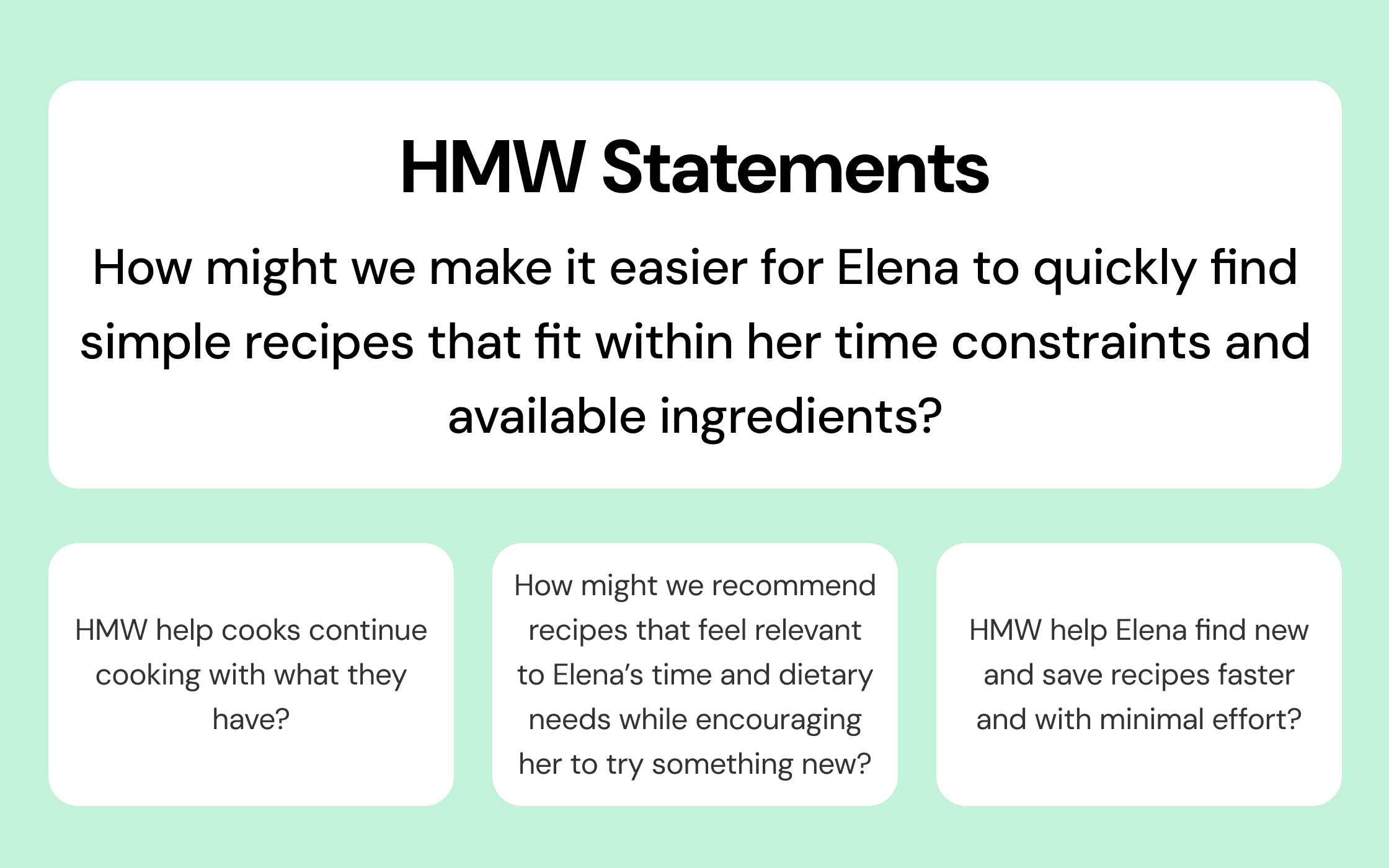
After creating a core problem statement I explored several HMW statements before landing on one to carry through to ideation.
02 Define
Focus and frame
Meet Elena, our novice cook.
After clustering themes with an affinity map, I synthesised the research into one persona to translate research findings into a representative user so that it is easier to build empathy and to stay grounded in real behaviours and needs when making design decisions. From there I defined a core problem statement before exploring How Might We questions to carry into the ideation phase.
Elena, 25, is a consultant who wants to be more adventurous in the kitchen but feels cooking becomes a mission after a long day of work. She wants simple, flexible recipes that she can adapt to what's in her fridge, with visual previews so she knows what she's getting into before she starts.
Success meant cooking felt achievable, not aspirational.
For Elena, success meant going from "I don't have the energy" to "I can actually make this" by finding a recipe that fit her time, effort and ingredients without scrolling through hundreds of options. For Toque, it meant small interactions that build engagement and a clear save flow that brings users back.
Exploring opportunities to help Elena.
After creating a core problem statement I explored several HMW statements before landing on one to carry through to ideation.
03 Develop
Ideate and iterate
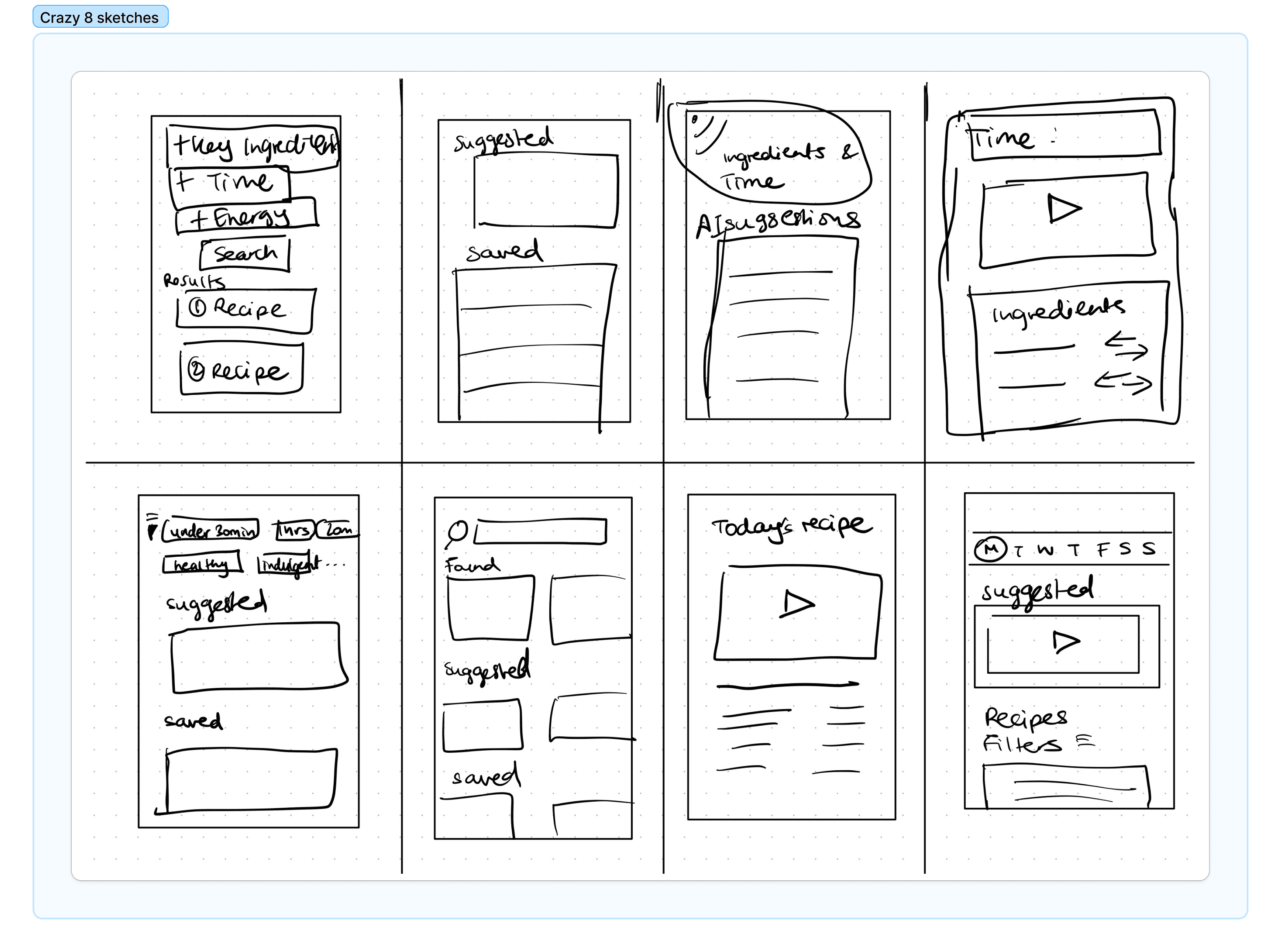
Crazy 8s to surface ideas fast.
With the HMW framing the problem, I sketched against one in a Crazy 8 round, then chose my strongest ideas. A home page with suggested recipes, time/effort/ingredient filters, ingredient swap, video-led recipe cards and customisable saved collections all earned their spot.
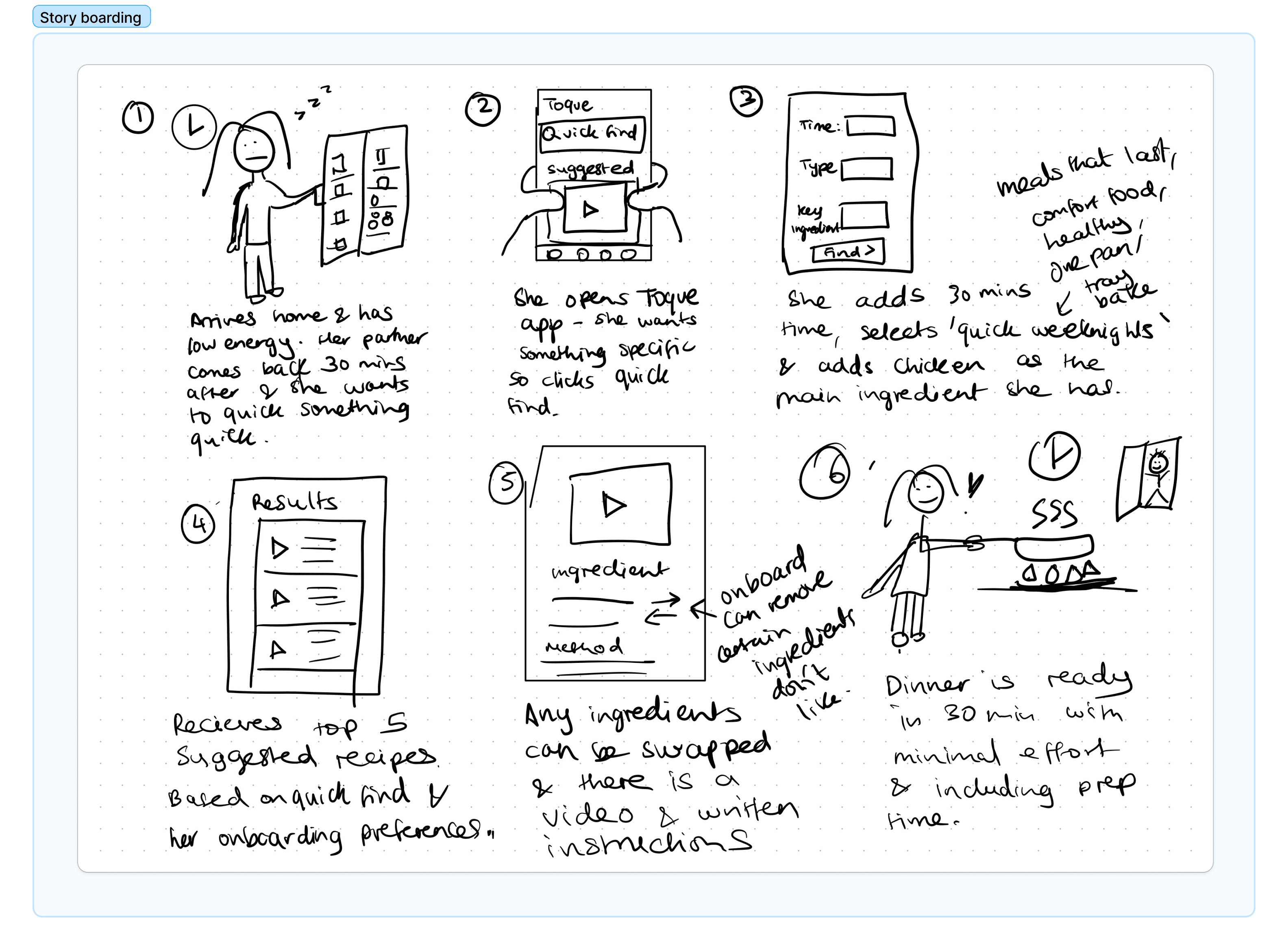
Storyboard and user flow to ground the ideas.
Using a storyboard on Elena's typical evening where she returns tired from a long day of work, opens the fridge, half-deciding what to make. I then mapped a user flow taking her through filter, recipe, ingredient swap and save. Moving through her journey uncovered the potential frictions and quickly showed what didn't belong in the prototype.
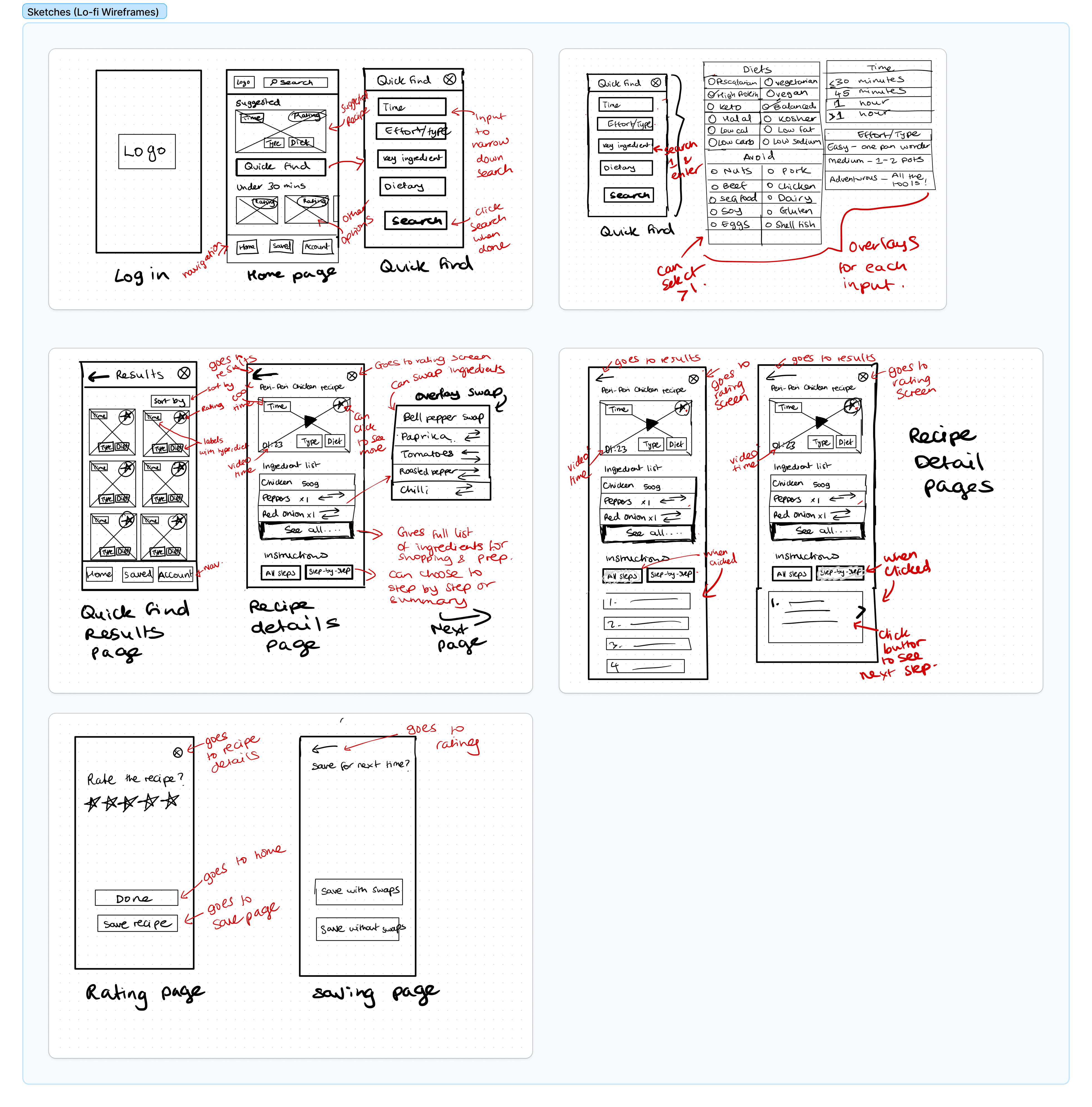
From sketches to a lo-fi prototype.
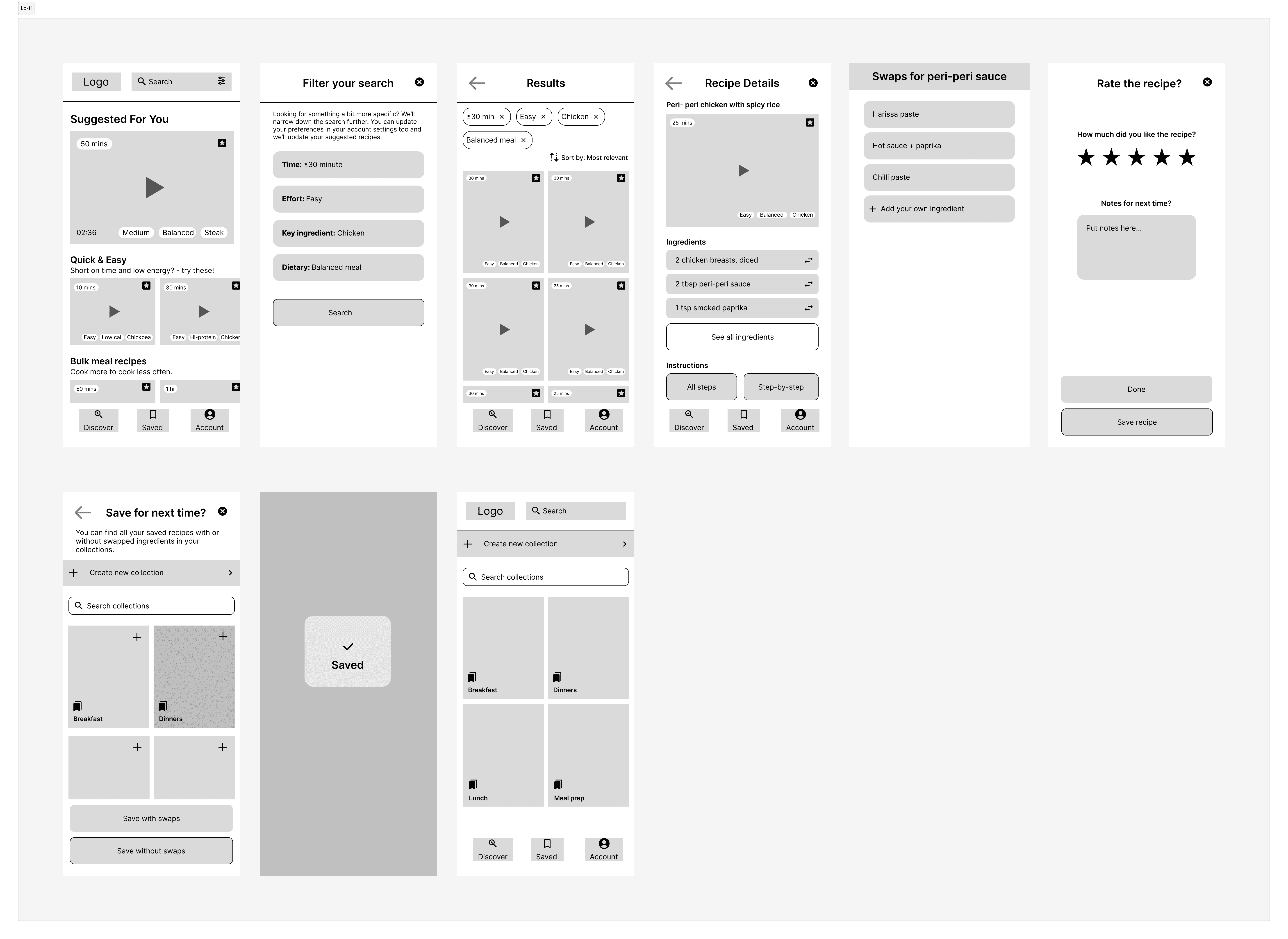
I sketched lo-fi wireframes for the home, search and filter, recipe detail and saved screens, then translated them into a lo-fi prototype in Figma.
01
A home that suggests, not just searches
"Suggested for you", "Quick & easy" and "By ingredient" categories on the home page so users land on relevance instead of having to scroll endlessly.
02
Filter by time, effort and ingredients
The three filters that came up in every interview, surfaced as a quick filter button rather than a deep settings menu.
03
Ingredient swap on every recipe
A swap icon next to each ingredient on the recipe detail page which directly addresses the "I don't have that" friction.
04
Save with the option to keep swaps
Recipes can be saved as-is or with the swapped ingredients, so the user can come back to their adapted version next time.
Usability testing surfaced the real friction.
I conducted moderated usability testing with 3 participants on the lo-fi prototype, testing three core tasks: finding a recipe, swapping an ingredient, and saving a recipe.
0/3 used the filter.
All 3 users completed the task, but every one of them went straight to a suggested recipe or the search bar and ignored the filter button completely. The filter wasn't broken but it was invisible because it wasn't placed in a location that users would naturally go to.
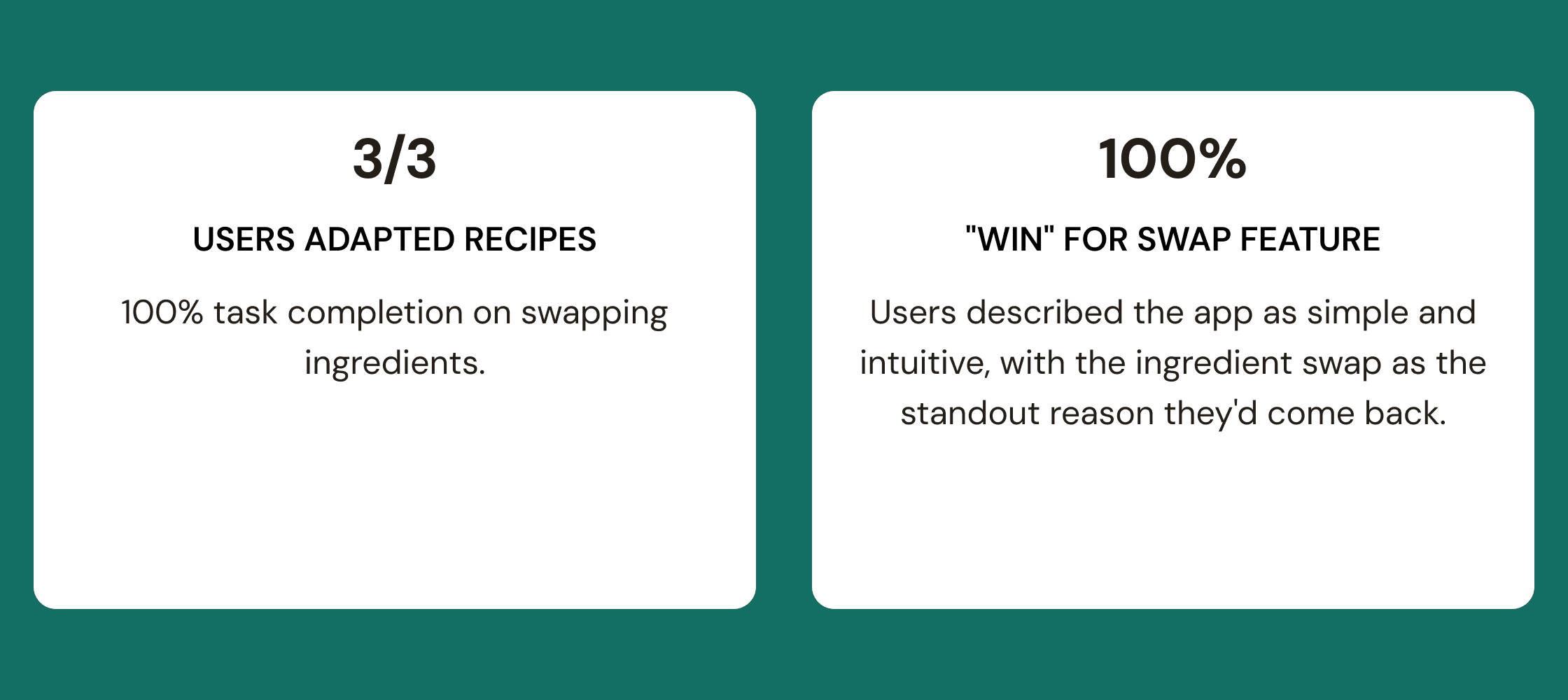
3/3 swapped ingredients, and loved it.
The swap feature was the standout. All 3 users completed the task and called out the feature as something they'd actually use. A few hesitated at the icon and asked if it was the right button before tapping which showcased a slight discoverability issue. Users who were a bit more seasoned cooks also wanted an option to add their own swaps.
0/3 found the save flow.
Every user hit "save" via the button in the bottom navigation rather than the save flow accessed by exiting the recipe. The bottom-nav icon was already strongly associated with saving, so users defaulted to it. Saving from the recipe detail page needed to be made far clearer.
The takeaway.
Features users wanted existed, but the entry points weren't where users looked. Visibility and labelling were doing the damage.
03 Develop
Ideate and iterate
Crazy 8s to surface ideas fast.
With the HMW framing the problem, I sketched against one in a Crazy 8 round, then chose my strongest ideas. A home page with suggested recipes, time/effort/ingredient filters, ingredient swap, video-led recipe cards and customisable saved collections all earned their spot.
Storyboard and user flow to ground the ideas.
Using a storyboard on Elena's typical evening where she returns tired from a long day of work, opens the fridge, half-deciding what to make. I then mapped a user flow taking her through filter, recipe, ingredient swap and save. Moving through her journey uncovered the potential frictions and quickly showed what didn't belong in the prototype.
From sketches to a lo-fi prototype.
I sketched lo-fi wireframes for the home, search and filter, recipe detail and saved screens, then translated them into a lo-fi prototype in Figma.
01
A home that suggests, not just searches
"Suggested for you", "Quick & easy" and "By ingredient" categories on the home page so users land on relevance instead of having to scroll endlessly.
02
Filter by time, effort and ingredients
The three filters that came up in every interview, surfaced as a quick filter button rather than a deep settings menu.
03
Ingredient swap on every recipe
A swap icon next to each ingredient on the recipe detail page which directly addresses the "I don't have that" friction.
04
Save with the option to keep swaps
Recipes can be saved as-is or with the swapped ingredients, so the user can come back to their adapted version next time.
Usability testing surfaced the real friction.
I conducted moderated usability testing with 3 participants on the lo-fi prototype, testing three core tasks: finding a recipe, swapping an ingredient, and saving a recipe.
0/3 used the filter.
All 3 users completed the task, but every one of them went straight to a suggested recipe or the search bar and ignored the filter button completely. The filter wasn't broken but it was invisible because it wasn't placed in a location that users would naturally go to.
3/3 swapped ingredients, and loved it.
The swap feature was the standout. All 3 users completed the task and called out the feature as something they'd actually use. A few hesitated at the icon and asked if it was the right button before tapping which showcased a slight discoverability issue. Users who were a bit more seasoned cooks also wanted an option to add their own swaps.
0/3 found the save flow.
Every user hit "save" via the button in the bottom navigation rather than the save flow accessed by exiting the recipe. The bottom-nav icon was already strongly associated with saving, so users defaulted to it. Saving from the recipe detail page needed to be made far clearer.
The takeaway.
Features users wanted existed, but the entry points weren't where users looked. Visibility and labelling were doing the damage.
04 Deliver
Ship and measure
From lo-fi to hi-fi with three targeted changes.
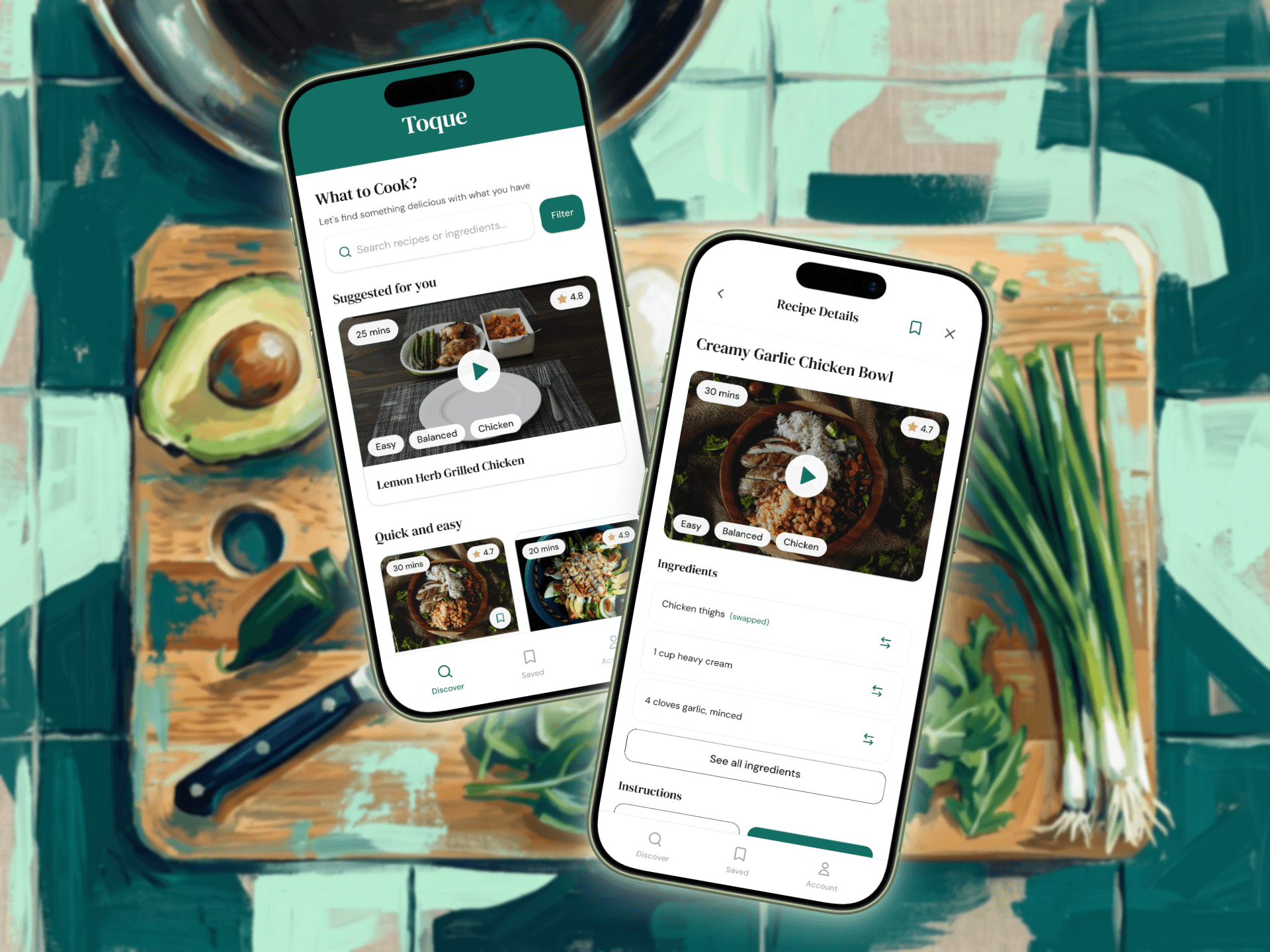
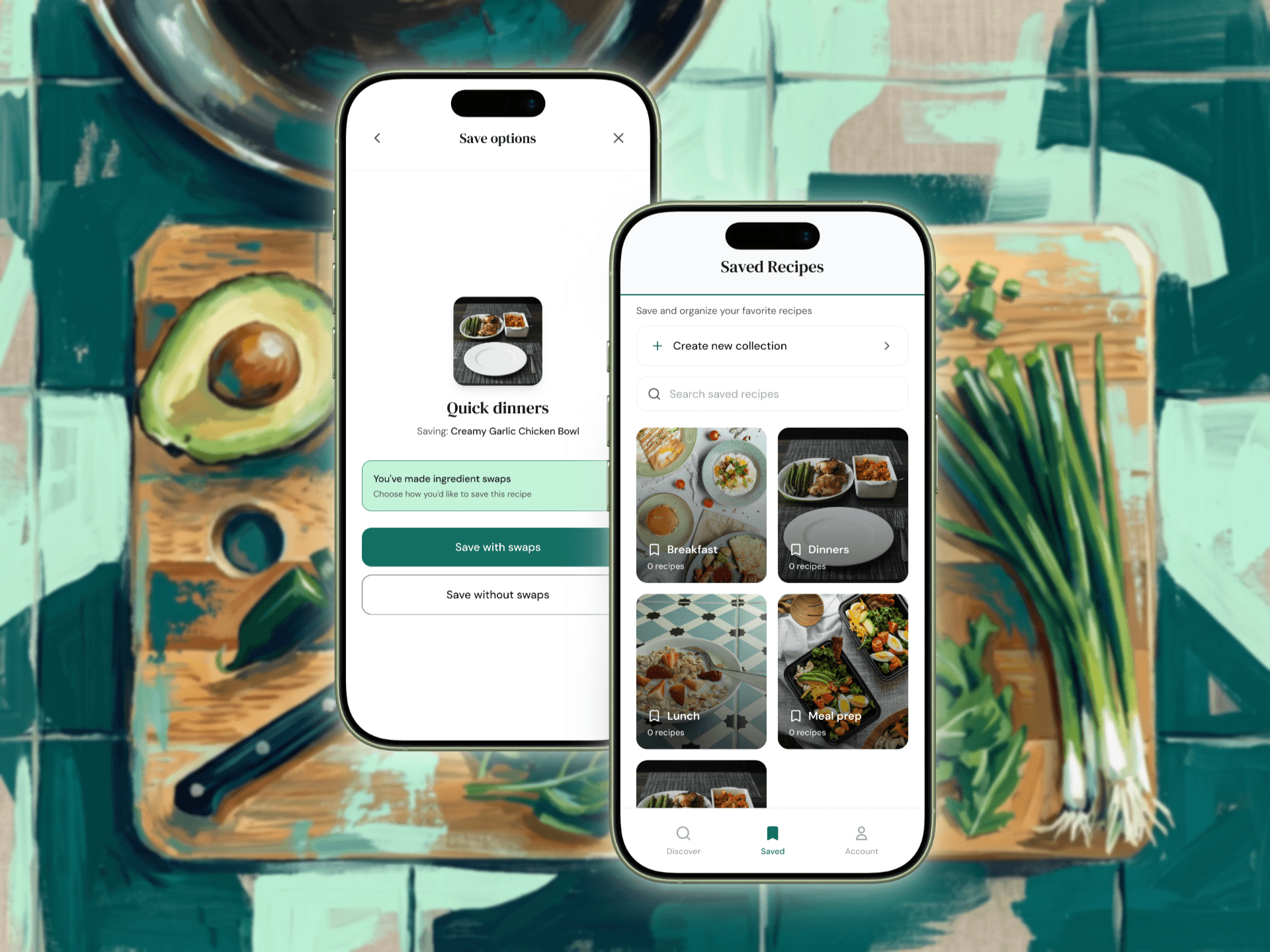
I took the testing findings into a hi-fi prototype built in Figma Make, with three focused fixes from the usability sessions. I moved the filter into the search bar so it sat exactly where users were already looking. I made the save flow clearer by adding a "mark as done" step that opens up clearer save options, including the choice to save with swaps. I also created an option for users to add their own ingredients so the swaps were fully customisable.
Experimenting with Figma Make to create a Hi-fi Prototype fast.
After applying the iterations, I built a quick colour palette and simple typography and used Figma Make to deliver an experience that felt calm, modern and food-led by using clean off-white backgrounds, a forest-green accent, and video-first recipe cards.
An app that adapts to the cook, not the other way around.
The redesigned filter sat where users instinctively looked, the ingredient swap landed as the most-loved feature in testing, and the save flow gave users a way to keep their adapted version of a recipe which they could find easily in their collections. Users described the prototype as simple and flexible which were the things novice cooks said they needed from the very first interview.
How I answered the brief.
Toque's brief was about giving novice cooks more ways to save and customise recipes, and finding innovative ways to engage and retain them. The redesign answered that on three fronts: customisation through the ingredient swap and saved-with-swaps option; engagement through a personalised home, video-first cards and quick filtering; and retention through saved collections that surface a user's own adapted recipes when they come back. Each feature mapped back to a friction users had actually voiced.
04 Deliver
Ship and measure
From lo-fi to hi-fi with three targeted changes.
I took the testing findings into a hi-fi prototype built in Figma Make, with three focused fixes from the usability sessions. I moved the filter into the search bar so it sat exactly where users were already looking. I made the save flow clearer by adding a "mark as done" step that opens up clearer save options, including the choice to save with swaps. I also created an option for users to add their own ingredients so the swaps were fully customisable.
Experimenting with Figma Make to create a Hi-fi Prototype fast.
After applying the iterations, I built a quick colour palette and simple typography and used Figma Make to deliver an experience that felt calm, modern and food-led by using clean off-white backgrounds, a forest-green accent, and video-first recipe cards.
An app that adapts to the cook, not the other way around.
The redesigned filter sat where users instinctively looked, the ingredient swap landed as the most-loved feature in testing, and the save flow gave users a way to keep their adapted version of a recipe which they could find easily in their collections. Users described the prototype as simple and flexible which were the things novice cooks said they needed from the very first interview.
How I answered the brief.
Toque's brief was about giving novice cooks more ways to save and customise recipes, and finding innovative ways to engage and retain them. The redesign answered that on three fronts: customisation through the ingredient swap and saved-with-swaps option; engagement through a personalised home, video-first cards and quick filtering; and retention through saved collections that surface a user's own adapted recipes when they come back. Each feature mapped back to a friction users had actually voiced.
Next steps
01
More usability testing
Three participants confirmed the direction, however I'd want to test the hi-fi with more users to validate the filter relocation, the new save flow, the option to customise ingredient swaps and to surface anything I missed in scope.
02
Custom ingredient swaps and personal recipes
Testing flagged that users wanted to add their own recipes which is a clear retention play that aligns with Toque's brief on engagement and sharing.
03
Onboarding to personalise day one
An onboarding flow that captures dietary needs, default time/effort and ingredient preferences so the home page is relevant from the very first session.
Next steps
01
More usability testing
Three participants confirmed the direction, however I'd want to test the hi-fi with more users to validate the filter relocation, the new save flow, the option to customise ingredient swaps and to surface anything I missed in scope.
02
Custom ingredient swaps and personal recipes
Testing flagged that users wanted to add their own recipes which is a clear retention play that aligns with Toque's brief on engagement and sharing.
03
Onboarding to personalise day one
An onboarding flow that captures dietary needs, default time/effort and ingredient preferences so the home page is relevant from the very first session.
Key Learnings
Not everything in the brief is attainable.
The hardest call was narrowing into a single core problem and HMW. Innovative ideas like meal-prep recommendations and "try something new" suggestions only got partial coverage and had to be parked for next time. Focusing on one core problem helps build the right direction for ideation and a tight set of features that creates impact.
The best feature is invisible without the right entry point.
The most useful thing testing taught me was that users don't fail at features, they fail at finding them when the journey isn't familiar to what they already use. The filter logic was fine but nobody saw it and the save flow worked but its entry point wasn't common. It taught me not to skip quickly past competitive analysis, so I better understand familiar flows and develop a designer's eye for what's actually common.
Why this project stuck with me.
I've been where my users were. Cooking is shaped by tiny moments of friction that can make the overall experience feel overwhelming. Designing for those relatable moments is what made this project genuinely fun.
Key Learnings
Not everything in the brief is attainable.
The hardest call was narrowing into a single core problem and HMW. Innovative ideas like meal-prep recommendations and "try something new" suggestions only got partial coverage and had to be parked for next time. Focusing on one core problem helps build the right direction for ideation and a tight set of features that creates impact.
The best feature is invisible without the right entry point.
The most useful thing testing taught me was that users don't fail at features, they fail at finding them when the journey isn't familiar to what they already use. The filter logic was fine but nobody saw it and the save flow worked but its entry point wasn't common. It taught me not to skip quickly past competitive analysis, so I better understand familiar flows and develop a designer's eye for what's actually common.
Why this project stuck with me.
I've been where my users were. Cooking is shaped by tiny moments of friction that can make the overall experience feel overwhelming. Designing for those relatable moments is what made this project genuinely fun.